Friday, September 29, 2023
#
For minor events a competitor should be allowed to go back on course and fix an error so they are not disqualified. The main goal is satisfied participants.
However, MeOS doesn’t make it that easy to download an SI a second time. Here’s how to do it:
In the Competitors section, click on the subsection Manage Cards.
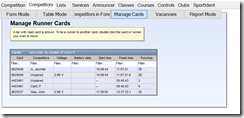
Find the card of the user who wants to download a second time and double-click the entry. This brings up a sub-window where the card can be moved to another user, or made “Unpaired”.
%20%E2%80%93%20MeOS_thumb.png "2023-09-29 14_46_14-Test-20230816 (local, no server) – MeOS")
Click on Unpair. Now this card can be deleted. Select it and press the red X in Table tools
%20%E2%80%93%20MeOS_thumb.png "2023-09-29 14_47_55-Test-20230816 (local, no server) – MeOS")
Deleting the card is optional, once unpaired, the user can download again. I would suggest to only unpair when the competitor wants to download, in case they change their mind – once unpaired, MeOS considers the runner “back in the forest”.
Monday, July 10, 2023
#
A Goat race is anorienteering race format where the competitor is allowed to skip one control without penalty (Some background and interesting history about the Billygoat format here and here – especially PG’s entry starting with “tradition” on the attackpoint page).
Anyways, if you want to compute results with MeOS where one missed control does not cause a mispunch, you need to declare a custom result calculation, which is done from the Lists tab:
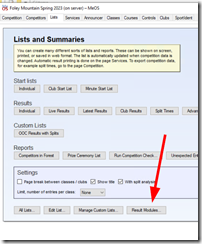
(click on image for full size)
Name the module and identifier as you wish. Pay attention to the Edit rule for dropdown:
There are 4 rules if it’s a team event and there are 4 rules if it’s an individual competitor event.
- Determine Status
- Compute total time
- Calculate Score
- Determine Points
A goat race doesn’t have points, so there is no computation necessary for the last item. The total time will not change, and the default rule if not specified returns the total time, so this is also not necessary to be specified. That leaves Status and Score
Determine Status
This method must return one of eight possible values: StatusOK, StatusDNS, StatusMP, StatusDNF, StatusMAX, StatusUnknown or StatusNotCompeting.
If the current status is other than MP, we just return that status, however if it is StatusMP, we count the number of missed controls, and if its only one, we return status OK, else we leave it as MP. We count the number of missed controls by checking how many split times have a value of –1. The full code is this:
if (Status == StatusMP) {
UnmatchedPunches = 0;
for (i = 0; i < SplitTimes.size(); i++) {
if (SplitTimes[i] == -1) {
UnmatchedPunches = UnmatchedPunches + 1;
}
}
if (UnmatchedPunches == 1) {
return StatusOK;
}
}
return Status;
Calculating Score
MeOS has this to say about calculating Score:
This is the most important method. It is used to calculate an internal score which is used to sort the competitors or teams and then to assign a place. A lower score means a better place; a negative score is better than any positive score. Equal score implies a shared place.
The default method returns Time if the status is OK, otherwise 900000 + Status. The fastest time gets the lowest score and wins. If the status is not OK, the score is higher than the score for any runner with status OK.
Here the custom results calculation again counts the number of splits for results with an initial status of MP – and if only one control was missed, it will return the runner’s time, else it returns a really big value – indicating error. Here’s the code:
if (Status == StatusOK) {
return Time;
}
else {
if (Status == StatusMP) {
UnmatchedPunches = 0;
for (i = 0; i < SplitTimes.size(); i++) {
if (SplitTimes[i] == -1) {
UnmatchedPunches = UnmatchedPunches + 1;
}
}
if (UnmatchedPunches == 1) {
return Time;
}
}
}
return Time + (Status * 900000);
Now that these two calculations have been added, make sure all classes use your Result Calculation Module. Select it here:
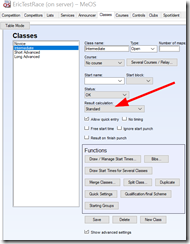
(click on image for full size)
Thanks to Jay Hann (Western Race Services) for the code.
NOTE
The calculation module in MeOS is a bit buggy in that it doesn’t always conform to the mathematical rules of precedence (multiplication/division before addition/subtraction). Even bracketing doesn’t always seem to work. I suggest keep the math to an absolute minimum, with lots of intermediary variables. I noticed this with MeOS 3.8U1 in the spring of 2023.
Monday, March 13, 2023
#
SPORTident Germany has recognized that to ensure that a SIAC will not fail during a race, its battery should be replaced every three years. To facilitate this process and make it as easy as possible for our clients we now have the necessary equipment in Canada to refresh your SIAC in a timely manner.
We now have blank SIACs in new plastic shells (all colours) with new batteries in stock. After we receive your SIAC we will copy your SIAC number and programmed owner information into a replacement SIAC with the same colour and ship that back to you, typically within a day.
We will also have the equipment on site at the Canadian Orienteering Festival 2023 in Ottawa and Montreal. We can refresh your SIAC there while you wait.
For more information please contact us:
info@o-store.ca
+1-844-967-8673
Thursday, August 12, 2021
#
As the cost of replacement parts has increased, it has become necessary to re-evaluate the cost of repairs to any SI control. Specifically we adjusted the base cost of opening / resealing a control.
Please see our Repair Info page for details.
Wednesday, April 7, 2021
#
SPORTident has released a new version (2.11) of their configuration program which is needed to reprogram controls, synchronize clocks (at least the SI-Master if you have that), and update firmware when bugs are found and fixed.
Because SPORTident has changed the way they check for software updates, all existing versions prior to 2.11 will not alert you that there is a new version available, and you need to download and install version 2.11 manually, from here.
Tuesday, July 28, 2020
#
SPORTident has updated their excellent user guide to include cleaning information of SPORTident timing equipment.
It especially describes how to best clean rental finger sticks.
The full article can be read here.
Saturday, May 20, 2017
#
This afternoon I received an email from an orienteer who had three mispunches, and he wanted to know what happened – he was sure he was at all three controls. He kindly sent me a picture of his results:
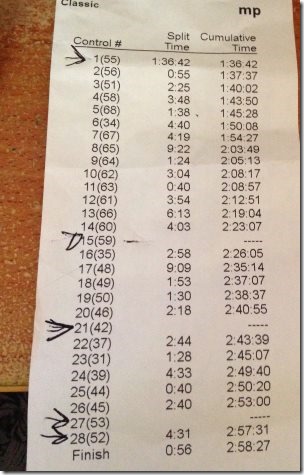
Immediately noticeable is the long time to the first control. This is an indication that the runner didn’t punch the start control. But this does not explain the three mispunches, with no extras at the bottom of the page that would show that he had punched the wrong control. So I pulled out our results computer to inspect what information had been downloaded.
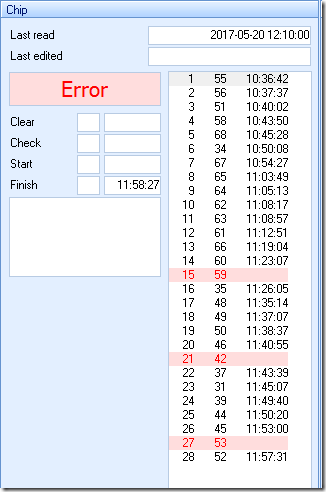
Here you see what OE2010 shows for this user. Interestingly Clear, Check and Start are all blank. Also the three controls are blank as expected. The runner used one of our club’s rental timing sticks – an SI-5. Since it’s a rental it had been used the previous week, and I expected to see some sort of time in the Start field.
Time to check the controls!
Here is the Clear control. As you see the finger stick was pulled out before the 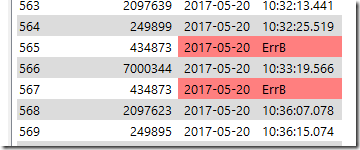 Clear completed. The user was not sure, and tried a second time, but again did not keep it in the control long enough. This would explain why there were no times in Clear, Check or Start: The fields were cleared, but then the Clear time could not be recorded before the stick was removed.
Next the Check control. Here you can also see 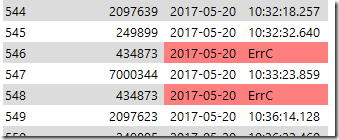 that the user tried twice, but it wouldn’t beep. I believe ErrC means Not-Cleared error – I will investigate this separately for another blog entry.
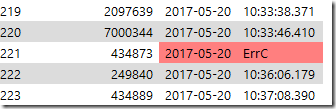 Now the Start control: Sure enough another ErrC – probably a Not-Cleared error.
Because no Start time was recorded, the event start of 9 o’clock is assumed by OE2010 – this explains the large amount of time up to the first control.
I won’t show what the controls of other than Control #53. The other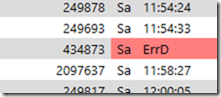 two controls showed nothing at all. Again here the user seemed to be too quick on the control and did not complete the download (again, a future blog post will explain the error codes). Interesting here is that this control uses firmware version 580, which does not record the date, only the day-of-week, while the other controls have firmware 656. I like that they show the full date!
In summary, I could show that this user (who has orienteering experience from way back, but is new to electronic punching) did not wait for the beep ‘n’ blink of one of the three mispunched controls as well as the Clear control. It can be assumed that he was even quicker on the other two controls, which did not even register an error.
Wednesday, April 12, 2017
#
This applies to the Martel printer only!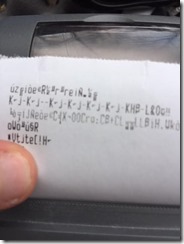
If your printer has started to show random junk symbols, like here on the right, then chances are the connection speed (known as the baud rate) has randomly changed. Here’s how you can find out, and fix it.
First check the baud rate. If the green light on the printer is on, press the SI logo briefly to turn off the printer.
Then hold the SI logo button down for 3 seconds and let go. The printer will now print its current settings, as well as a short strip showing the various fonts the printer is capable of.
H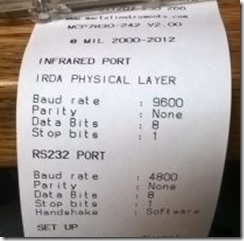 ere’s what the settings printout should look like. The critical part is the section titled ‘RS232 PORT. Note the Baud rate of 4800. If yours shows a different baud rate, then you change it as follows.
If your printer shows 4800 baud, then you need to check if your control has changed baud rate. That will be in the next post.
The following is a direct quote from the Printer manual.
Printer Configuration
- Ensure the printer is OFF.
- Press and hold the Mode [the SI logo] button. After some seconds, the Status light will flash five times to show that the printer is in configuration mode. Release the Mode button.
- Press the Mode button the same number of times as the option that you wish to change (for example to change the RS232 baud rate, press the Mode button four times).
- After a short delay, the Status light will flash the same number of times as the option that you have chosen. If you have made a mistake at this stage, simply wait: after a delay, the printer will power-on without changing any options.
- To proceed with configuration, press the Mode button the same number of times as the setting that you wish to make (for example, to set the baud rate to 4800, press the Mode button six times).
- After a short delay, the Status light will flash the same number of times as the setting that you have made.
- After a further delay, the printer will power-on with the new setting.
Subset of configuration options
| Option | Description | Setting | Description |
| 3 | RS232 proto | 1 | 8 data bits, No parity |
| 4 | RS232 baudrate | 6 | 4800 baud |
| 5 | RS232 Handshake | 2 | Software |
| 11 | Sleep/wake | 1 | Never sleep |
| | | 2 | Sleep after 1 minute |
| | | 3 | Sleep after 2 minutes |
| | | 4 | Sleep after 5 minutes |
| | | 5 | Sleep after 10 minutes |
| | | 6 | Off after 1 minute |
| | | 7 | Off after 2 minutes |
| | | 8 | Off after 5 minutes |
| | | 9 | Off after 10 minutes |
There are other options, but those are the interesting ones.
Please send me an email if this does not solve your problem.
Monday, February 6, 2017
#
Around November 2016 SPORTident posted the latest version of the SI-Config+, along with a new firmware version (656). As there are known deficiencies in firmware versions 623 and 649, it is strongly recommended to upgrade any controls with 600-series firmware to 656.
Friday, September 30, 2016
#
So it seems that SI-Print (version 2.0.2) doesn’t work anymore – at least not in Windows 10 with the printer control directly connected. I could not talk to it successfully when directly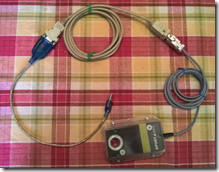 connected to the computer with a USB-to-Serial cable and then through a null-modem (the grey cable with a female 9-pin socket at either end).
SI-Print just wouldn’t work. SI-Config+ talked to it just fine, and a terminal emulator showed me that the printer control sent the correct data.
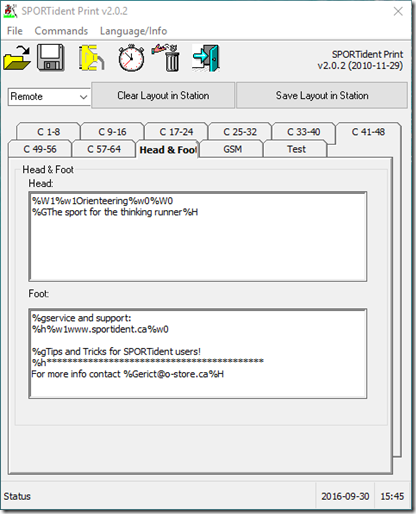
But there is a solution. SI-Print does work when a download control is connected, and the printer control is accessed as Remote. You can’t use SI-Print to test y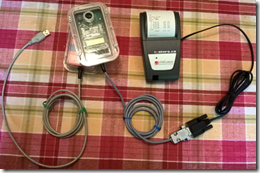 our layout, but you can leave your printer connected to the printer control and test on the printer itself.
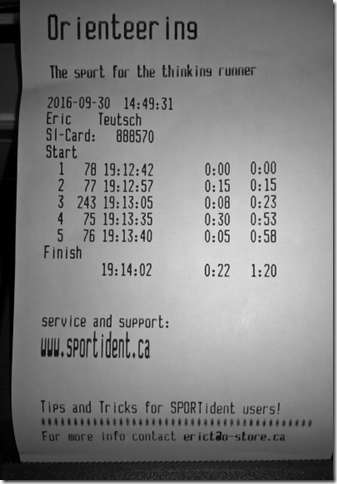
Below are the settings I specified (follow your printer specifications, and type a percent - % to code the ESC character), and the finished goods, below.
The printer specific codes for the current SPORTident printer (MCP7830 by Martel) can be downloaded at http://martelinstruments.com/sites/default/files/images/stories/datasheets/mcp7830_adq.pdf
Make sure to use the tables on page 5 (RS232 mode).